

Friday, February 13, 2015
Owncloud
Last year I decided to give freeNAS another try despite the warnings
of not having ECC memory and running in a VM. Long story short, it ran
great for awhile. I had freeBSD jails setup for CrashPlan and Owncloud - it was
heaven! It was all running smoothly until not having ECC memory caught
up to me. I began to have checksum errors, so I had to dump the data.
Much faster than restoring from backup.

Wednesday, February 4, 2015
HA: DomotiGa Web Interface
DomotiGa is an open source Linux app written in Gambas which I hadn't heard about until now. As part of any good home automation or any connected project is a way to control it remotely and easily, otherwise it's easier just to hit the light switch yourself, right? I am using a Ubuntu Virtual Machine running in VMWare ESXi. VMWare offers ESXi as a free version of there enterprise bare metal hypervisor. ESXi can run on most hardware but if you have trouble there are plenty of guides out there to get drivers working.
One of the easiest ways to get a remote interface is a website. It is much easier, universal and platform independent compared to using an app. There are two types of web interfaces available in DomotiGa. I tested both out to pick the best one for my application and decided that since each one serves a different purpose I would leave both active.
Simple Web Client
DomotiYii

From the above screenshots I am sure you can tell the difference between the two. The simple web client is well, simple, and it is great for quickly checking sensor data or controlling switches. But for advanced management, DomotiYii fits the bill. I keep the simple web client running in a browser window on my left monitor. It can auto refresh and the changes turn green momentarily.
This would be a good interface to easily setup a Raspberry Pi with a display on the wall as a status display. DomotiGa has a JSON RPC interface so it wouldn't be hard to grab the data and pipe it into your own front end. There is another system that makes easy to design a UI and interface it with DomotiGa, one is CF iViewer https://www.domotiga.nl/projects/domotiga/wiki/CF_iViewer
One of the easiest ways to get a remote interface is a website. It is much easier, universal and platform independent compared to using an app. There are two types of web interfaces available in DomotiGa. I tested both out to pick the best one for my application and decided that since each one serves a different purpose I would leave both active.
Simple Web Client
 |
| DomotiGa Simple Web Client |
DomotiYii
From the above screenshots I am sure you can tell the difference between the two. The simple web client is well, simple, and it is great for quickly checking sensor data or controlling switches. But for advanced management, DomotiYii fits the bill. I keep the simple web client running in a browser window on my left monitor. It can auto refresh and the changes turn green momentarily.
This would be a good interface to easily setup a Raspberry Pi with a display on the wall as a status display. DomotiGa has a JSON RPC interface so it wouldn't be hard to grab the data and pipe it into your own front end. There is another system that makes easy to design a UI and interface it with DomotiGa, one is CF iViewer https://www.domotiga.nl/projects/domotiga/wiki/CF_iViewer
Monday, February 2, 2015
Kickstarter: ArduRF
Today I received a few packages but one of them contained the ArduRF from Kickstarter. This campaign was short and sweet. I received the reward thirty-three days after it ended. You can read about the details from their Kickstarter but it's an Atmega328p (Arduino Uno) with the RFM69 embedded. One has a USB A connector that can plug directly into your PC. This can act like a base station/receiver. This will replace my node connected to an FTDI cable to my Ubuntu VM. Using the JeeNode library in compatibility mode, the RFM69 should work with the RFM12B radios until I completely transition over. The other is similar to an Arduino Pro Mini but longer with the addition of a JST LiPo battery connector with the charging circuit and a mini USB for programming. These are great boards to add to your network or to get you started with low power RF. Plus they are very well priced. I look forward to diving in and posting more about these.
Check them out! You can find them on their site http://www.ezsbc.com/ or https://www.tindie.com/stores/ddebeer Happy tinkering!

Check them out! You can find them on their site http://www.ezsbc.com/ or https://www.tindie.com/stores/ddebeer Happy tinkering!
Tuesday, January 20, 2015
La Crosse Weather Station Gateway
Its alive! Last Christmas (or was it the one before that?), I received a La Crosse wireless weather station from my mom who is obsessed with them. This one has just a small display that can gauge inside and outside temperature. What interested me is that it's a simple 433Mhz radio link. So sometime between then and a while ago, I got a 433Mhz receiver from Sparkfun with the intention of capturing the binary data from the outside sensor.
 |
| Stock photo from SFE - CC BY-NC-SA 3.0 |
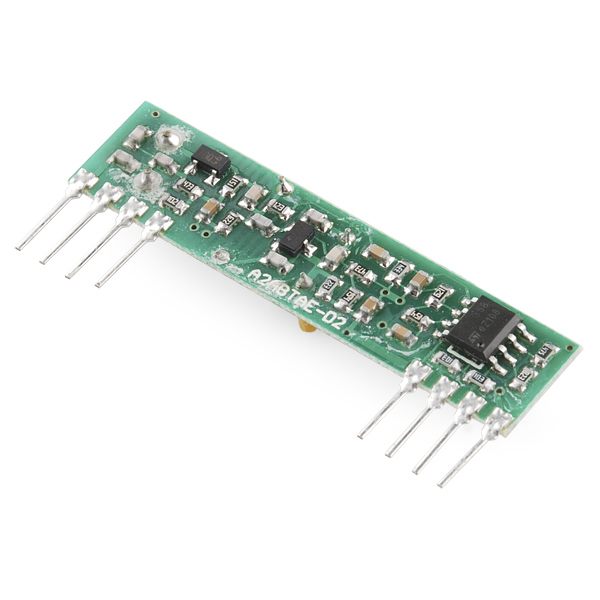
Finally Some Home Automation
With all the busyness of FriedCircuits and with taking a late honeymoon to Europe, there hasn't been very much time left for other just-for-fun projects. It's taken a long time to scale up productivity after our trip. A few weeks ago I finally started to dive into getting some sort of a start on home automation, or domotica, as its called across the pond. Since the failure of the Smart Outelet I decided to start on a smaller piece of the home automation beast this time around. Having been following JeeNodes for awhile now, I wanted to make a custom version in which I actually had done last year and never posted about it. I did some testing with his setup and the HouseMon server running on a Rasberry Pi. I have been toying with the idea of writing my own from scratch but I don't have the time and why reinvent the wheel, right? On my daily travels of the web (Feedly) I have come across a lot of home automation projects, but one piece of software struck my interest and this is what got me back to exploring this space.

Thursday, January 8, 2015
Wizkers.io Is Live!
Happy New Year! Begin 2015 with Wizkers.io - an easy to use Open Source application that is great for makers and programmers alike. It was designed and is managed by Edouard Lafargue, a fellow maker who has greatly contributed to the USB Tester, which is supported by Wizkers.io. Now that's Open Source in action!
//We look forward to posting projects using Wizkers.io and the USB Tester!

Here is his press release:
"We are live!
After about two years of work, I am very happy to announce the launch of Wizkers.io.
What is Wizkers? Wizkers is an Open Source application that gives a web interface to your instruments. And much more.
What's in it for you ? Your measurement instruments often have great IO capabilities that are underutilized. Wizkers unlocks those. You are building a great project that generates a lot data, but you don't want to get locked into one particular Internet of Things provider, and don't want to spend inordinate amounts of time building a great user interface for it. Wizkers solves this.
With Wizkers, you can visualize, log, download, and send instrument data to cloud services, all using one consistent interface. And if your instrument supports it, you can do full remote control too!
Imagine your USB-connected power meter being able to do full-screen data graphs, data logging, and even real time uploads to IoT services. This is exactly what Wizkers lets you do.
Wizkers is a pure HTML5/Javascript application which runs in Google Chrome, and is incredibly easy to setup: you can head over to the Chrome webstore (goo.gl/DgLqXH) and get up and running in a matter of seconds.
Wizkers is not limited to running as a Chrome app. You can also install it on any embedded device - Beaglebone or other - to create a web interface for your measurement instruments, or even for your own DIY projects. And thanks to the Apache Cordova project, a native Android version is coming up too.
Wizkers is still beta software. Expect a few bugs, but I feel that I have now reach a level of stability that makes it possible for a larger audience to start experimenting with it. Your feedback will be invaluable!
So what instruments does Wizkers support out of the box today? At the time of release, we have support for the Medcom "Onyx" Geiger counter, the Fried Circuits USB current/voltage/power meter, Fluke 287/289 digital multimeters, and the Elecraft KX3 Amateur radio transceiver. And more instruments are on the way.
Wizkers also supports IoT data services like helium.co for data input.
Last, all the data recorded by Wizkers can be forwarded on to cloud services - talking to "dweet.io" is a no brainer - with a generic REST API output plugin, and more specialized services like Safecast.org.
Wizkers is already being used daily by a team of beta testers whom I really want to thank for all their support, encouragement and great feedback!
With this, I encourage you to head over to wizkers.io and discover what it can do for you!"
Sunday, December 7, 2014
USB Tester Firmware and Java App Update
It's been awhile since there has been an update to the firmware or the Java app. I have been working on them on and off for a few months now and I am finally at point for a release. Both the firmware and the Java app have some significant and important changes. I hope this brings some useful changes and lays the groundwork for future updates. Now onto the details...
Java App: https://github.com/FriedCircuits/FC-USB-Tester-Data-Logger-App
USB Tester Firmware: https://github.com/FriedCircuits/FC-USB-Tester-OLED-Backpack
For the firmware you can download the working zip 2.1 which includes the new UG8Lib in the libraries folder. More information on how to update can be found here: http://friedcircuits.us/docs/oled-backpack-how-to-update-firmware/
For the Java App, for Windows download the Windows folder which has the exe (launch4js wrapper) and the needed libraries. For Linux\OSX download the Jar and libraries.
Some future ideas:
Please submit any bugs or suggestions to Github so I can track them.
 |
| Arduino Yun booting and running OLED Adafruit Test Sketch - USB data not connected to PC |
Java App: https://github.com/FriedCircuits/FC-USB-Tester-Data-Logger-App
- Start of changelog
- Uses temp file instead of memory for better long term logging
- Able to resume unsaved session
- Remote control of USB Tester display
- Option to stop updating graph for long term logging
- Option to change graph refresh speed
- Option to set how long(in minutes) to keep history in graph or 0 for all
- Display max and mins on voltage\current graphs
- Check github for new version
- Check firmware version and check github for new version
- About dialog shows versions
USB Tester Firmware: https://github.com/FriedCircuits/FC-USB-Tester-OLED-Backpack
- Start of changelog
- Switch to UG8Lib display library
- Clean up Energy and Peak\Mins screens
- Updated large font screens with bar graphs that auto scale
- Added firmware version with serial command
For the firmware you can download the working zip 2.1 which includes the new UG8Lib in the libraries folder. More information on how to update can be found here: http://friedcircuits.us/docs/oled-backpack-how-to-update-firmware/
For the Java App, for Windows download the Windows folder which has the exe (launch4js wrapper) and the needed libraries. For Linux\OSX download the Jar and libraries.
Some future ideas:
- Possible firmware updating from Java app (Have to figure out cross platform)
- Online real-time usage map of the the Java app by country.
- Not really needed but could be cool. It would be just by country and could be turned off in the app.
Please submit any bugs or suggestions to Github so I can track them.
USB Tester and the DigiSpark Pro
After supporting the DigiX on Kickstarter, I have become a fan of DigiStump. So what better way to support them than buy stuff? I supported their new Kickstarter this year for the DigiSpark Pro. I got the beta kit which they made at their office and it came with the extras along with being shipped sooner. I posted about the details earlier: http://www.mobilewill.us/2014/06/digispark-pro.html. I finally got around to doing some basic power testing with the USB Tester. I took this picture just before our vacation.

Running the basic blink sketch its using about 22mA. Which is less then an Arduino Uno.
Running the basic blink sketch its using about 22mA. Which is less then an Arduino Uno.
Subscribe to:
Posts (Atom)